
Support
How to protect your Versa account from scams
What Versa does to protect your account (2FA, OTP for cash out), fake agent and APK scams, how to change or reset your password, and what to do if your phone is lost.
Quick answer
- Versa has no agents or advisors. Anyone claiming to be an agent and asking for your OTP is a scam.
- Download the app only from the App Store, Play Store or AppGallery. Never install an APK.
- Every cash out needs an SMS OTP, and money can only go out to a bank account under your own name.
What you need
- A Versa account
- An email and phone number you control
What Versa already does
Versa uses several layers to protect your account:
- 2FA for any important account change.
- SMS OTP when adding a bank and every time you confirm a cash out.
- Locked bank details. Saved bank details can’t be changed by yourself, and money only goes out to a single-name account under your own name.
- Assets held by a trustee, not inside Versa’s own account.
This means even if someone gets your password, they’d still need the OTP sent to your phone, and the money can’t be sent to their account.
01/04
Open Settings
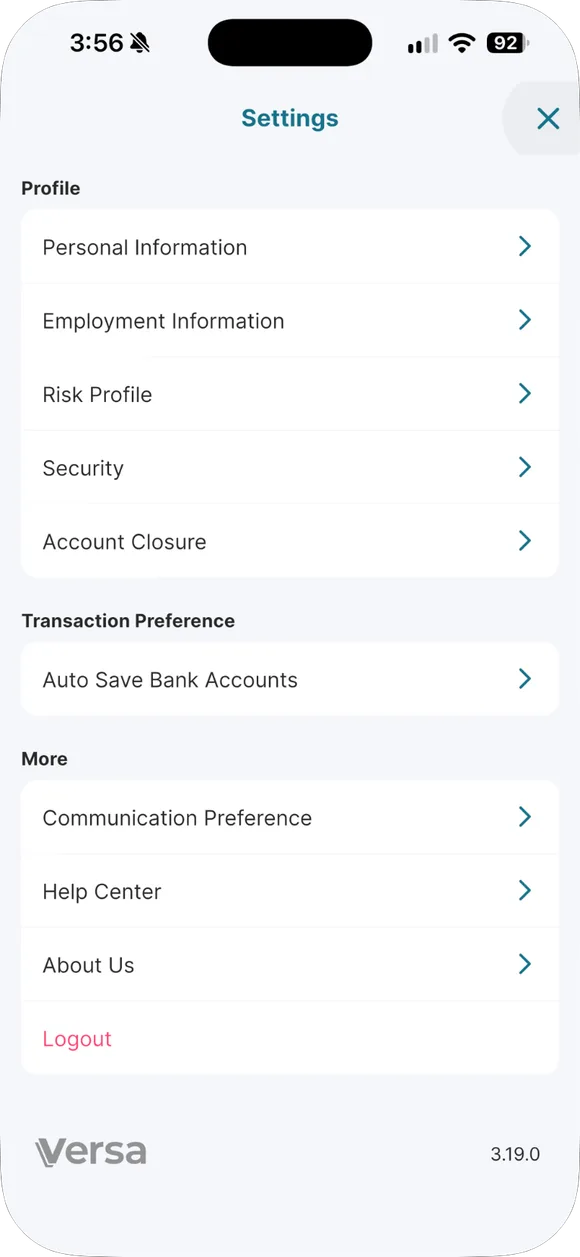
Tap the three-line icon at the top right. Security (change password and Biometric Login) and Help Center are on this Settings screen.
- Open Settings. Tap the three-line icon at the top right. Security (change password and Biometric Login) and Help Center are on this Settings screen.
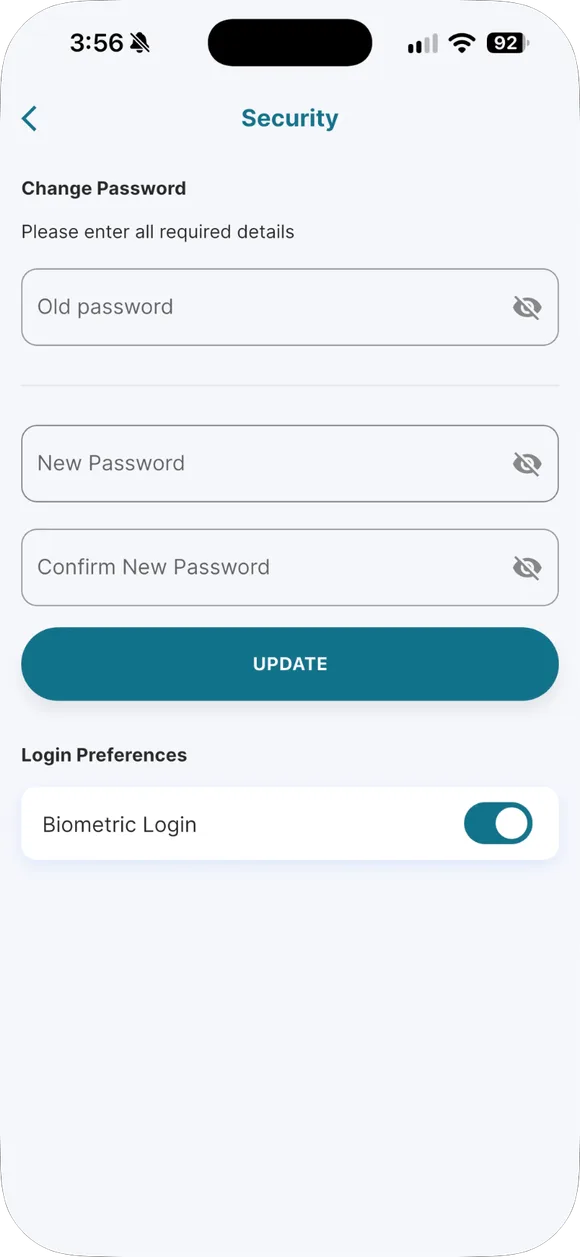
- Change your password. Important changes ask for 2FA confirmation. Use a password you do not use anywhere else.
- Forgot password. Tap Forgot Password and follow the email OTP. Versa will never ask for your password over WhatsApp or a call.
- Bank details are locked. Saved bank details cannot be edited by you. This protects you if your phone is stolen.
Scams that commonly target Versa users
If you’re unsure whether someone is really from Versa, email support@versa.com.my to confirm. Don’t reply to that message first.
Daus himself will never ask for your OTP, password or money. Daus only shares tutorials and his referral code. If an account claiming to be Daus asks for any of that, report the account.
Password
Change your password. Open the menu (three-line icon at the top right) → Security → enter your old password, then your new password twice → tap Update, and follow the confirmation if asked.
Forgot your password. On the login screen, tap Forgot Password → enter your registered email → enter the OTP from your email → create a new password.
Email OTP not arriving? Check your email spelling and make sure there’s no trailing space. Wait at least 5 minutes. Check your Spam, Promotions and Updates folders. Still nothing, email support@versa.com.my.
Phone lost or stolen
- Contact your telco to block your SIM and get a replacement SIM with the same number. Cash out OTPs are sent to that number.
- Contact Versa at 03-7890 3500 or support@versa.com.my and ask for your account to be temporarily protected.
- Change the password for the email linked to Versa.
- Once you get a new phone, install the app from an official app store and log back in.
Small habits that protect a lot
- Lock your phone with a PIN or biometrics.
- Use a Versa password that’s different from your other accounts.
- Never screenshot and share a screen showing your OTP or bank details.
- If the app is under maintenance and you need to transact urgently, email support. Never use a “middleman service”.
Common questions on this topic
Is Versa safe, or is it a scam?
Versa is regulated by the Securities Commission Malaysia as a recognised market operator. Your money sits with an independent trustee (HSBC, Deutsche, CIMB), not in Versa's own company account.
Source: Versa Help Centre #12622507204759 ↗ · Versa Help Centre #12622553562391 ↗
Someone messaged you claiming to be a "Versa agent". Is that real?
Versa has no agents or advisors. Ignore anyone claiming to represent Versa, and email support@versa.com.my to confirm.
How do you change your linked bank account?
A bank that's already added can't be edited directly, so add a new bank on the Cash Out page, or ask support to remove the old one.
OTP email not arriving?
Check the email spelling, wait 5 minutes, check the spam/promotions folder, and if it still doesn't arrive, email support.
What happens to the money if the account holder passes away?
Versa has no nominee feature, so the heir or administrator settles it with AHAM using a probate letter or letter of administration.
Source: Versa Help Centre #12594649546135 ↗ · Versa Help Centre #12594674496919 ↗

Already have a Versa account?
Open the app and do this step now, while it is fresh in your mind.
Past returns do not guarantee future returns. Unit prices can go down. Not financial advice.