
Mission 3 · First cash-in
How to cash in to Versa and when the money shows in the app
The right way to do your first cash in for the RM10 reward, the 10am and 3pm cut-offs, why the app shows 0, and a calculator for when your money arrives.
Quick answer
- Cash in using FPX only, from a bank account under your own name.
- First cash in must be RM100 or more in a single transaction. RM50 + RM50 doesn't count for the reward.
- Money shows in the app T+2 business days. In on Saturday, processed Monday, shows up Wednesday.
What you need
- A verified Versa account
- Online banking (FPX) for an account under your own name
- A decision on which fund to start with
Cash in isn’t like a DuitNow transfer
Cash in isn’t like a DuitNow transfer. Your money has to buy fund units first. If you go in before the cut-off on a business day, Versa processes it that day, and the money shows in the app 2 business days later. Go in on Saturday? Versa processes it Monday, shows up Wednesday. Don’t panic, the money isn’t lost.
First cash in: one transaction, RM100 or more
So for your first cash in, put in First cash-in requirement: RM100 or more in a single transaction. Any fund counts, including Save, Invest or PRS.
For anyone planning to keep money in Save, RM1,000 is a reasonable amount to start with. Not because of the reward (RM100 is already enough for the RM10), but because Booster rateAn extra annual percentage on the portion of your Save balance that qualifies, paid out the following month. only count days where your Save balance stays Minimum balance for boosters: RM1,000 in Versa Cash or Cash-i. If your balance is below that, the quest pays nothing. Go by what you can afford.
Follow each screen
01/10
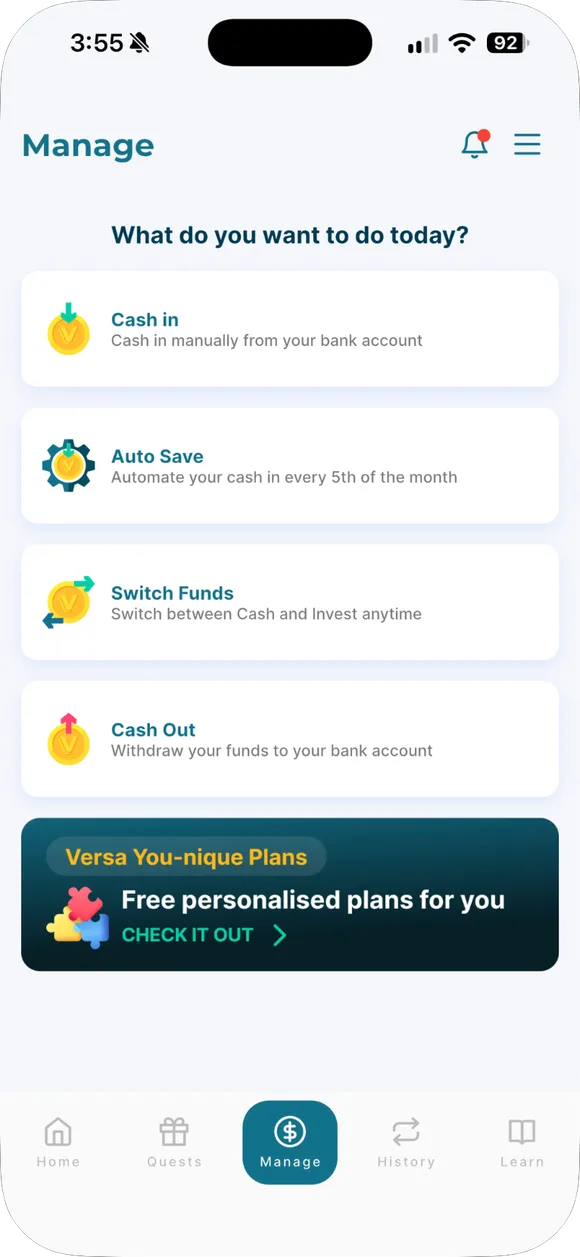
Open Manage
From the home screen, tap Manage. Every transaction (Cash In, Cash Out, Switch, Auto Save) lives here.
- Open Manage. From the home screen, tap Manage. Every transaction (Cash In, Cash Out, Switch, Auto Save) lives here.
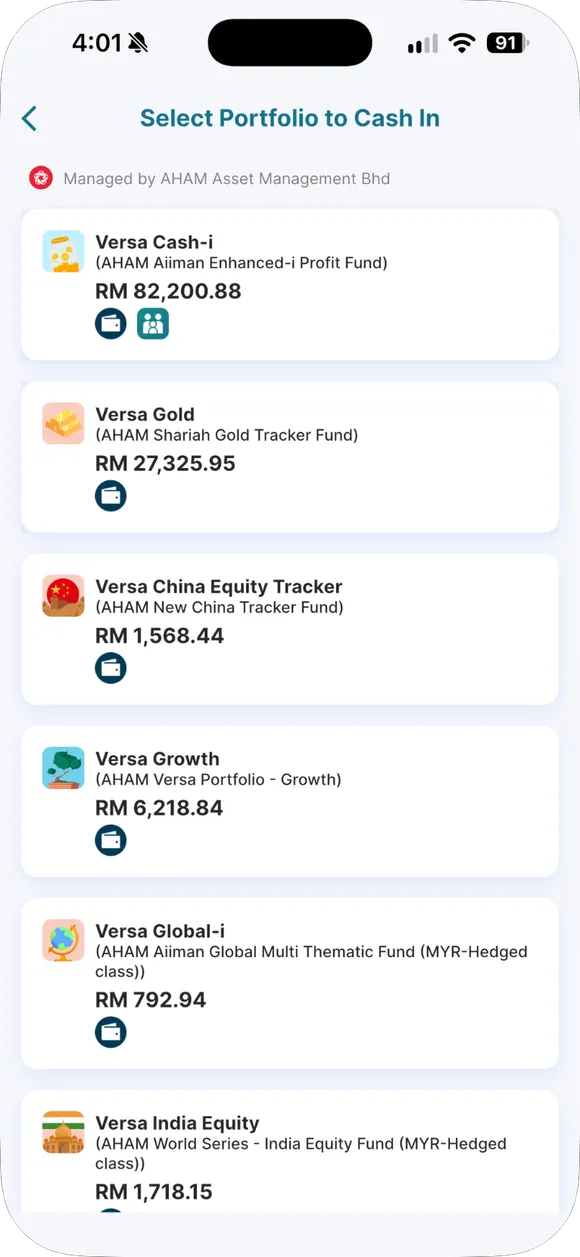
- Choose a fund. Tap Cash In, then choose a fund. Many people start with Versa Cash-i or Versa Cash because the minimum is RM10 and the risk is low.
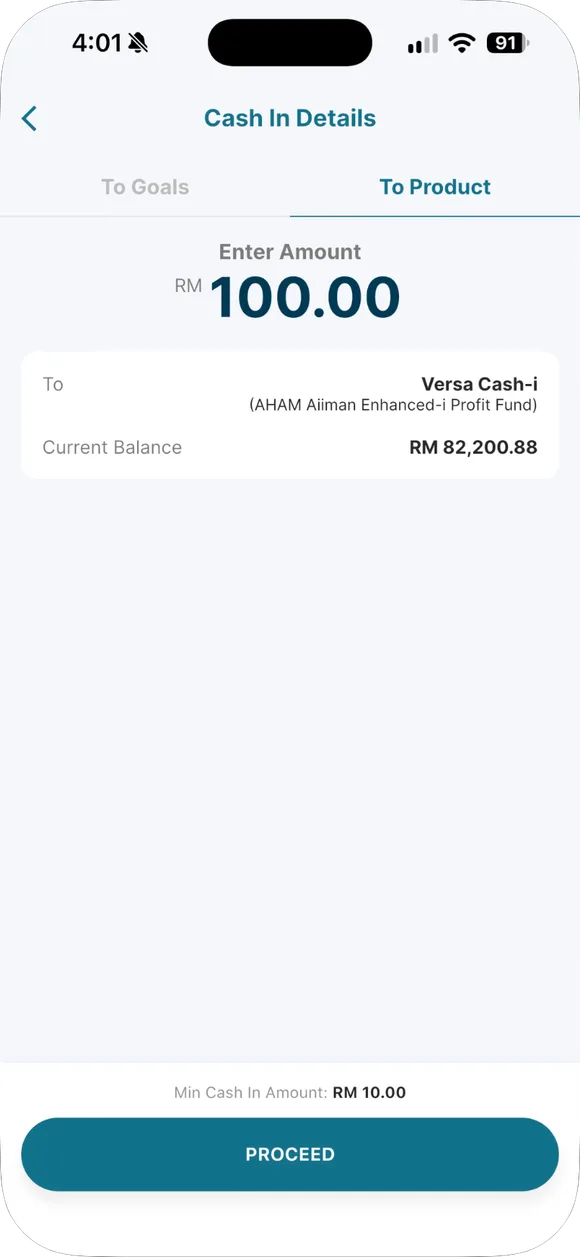
- Type the amount. For your first cash-in, type RM100 or more in one transaction. RM50 today and RM50 tomorrow does not count for the reward.
- Check and swipe. Check the fund name and amount. Swipe to confirm. Once submitted, a cash-in cannot be cancelled.
- Read the Additional Notes. This screen reminds you about cut-off times and processing. Read it once, then continue to FPX.
- Choose your FPX bank. Choose a bank account in your own name. Joint, company or spouse accounts are rejected and the money is refunded.
- Log in to your bank. Log in to online banking as usual and approve the payment. This is your bank's page, not Versa's.
- Back to Versa. See the success screen? Good. The money has left your bank but does not show in your app balance yet.
- Processing status. In transaction history, Processing means your money is buying units. This is normal.
- Completed status. When it says Completed, your app balance has gone up. For Save, returns accrue daily from here.
Minimum and maximum
| Amount | |
|---|---|
| Versa Cash, Versa Cash-i | Minimum cash-in for Save: RM10 |
| Most Invest funds | Minimum cash-in for Invest: RM100 |
| Versa US-Tech, Versa India Equity | Minimum for Versa US-Tech, India Equity and China Equity Tracker: RM1,000 |
| Maximum per transaction | Maximum per transaction: your bank's FPX limit, usually RM30,000 |
There’s no limit on how many times a day. But every cash in Cancelling a cash-in: not possible once submitted, so double-check the amount and fund before you swipe.
Which banks work
Cash-in method: FPX only, from Bank account for cash-in: single-name account in your own name only (no joint, company or third-party). No debit card, credit card or DuitNow. Money from your spouse’s or a company’s account will be refunded, and you’ll just have wasted time.
Cut-off: why the time you tap matters
Each fund has an end-of-business-day time:
- Versa Cash-i: Versa Cash-i cut-off: 10:00 AM on business days
- Versa Cash and all Invest funds: Versa Cash and Invest cut-off: 3:00 PM on business days
Before the cut-off on a business day, that day becomes day T (processing day). After the cut-off, on weekends or public holidays, T becomes the next business day. Money shows in the app Cash-in shows in the app: T+2 business days after T.
Examples from Versa’s own schedule:
- Cash in Monday 1:30pm to Versa Cash → T is Monday → shows up Wednesday.
- Cash in Saturday 8pm → T is Monday → shows up Wednesday.
- Cash in the day before a public holiday after the cut-off → add one more day.
Work out your own date
Pick the fund, date and time. If this is your first cash in on a new account, tick that box and enter the date your account was verified.
When will my money arrive?
Choose the transaction, fund, date and time. The calculator counts business days using Versa's official schedule.
Shows in the app: Mon, 21 Sep 2026
- 1Wed, 16 Sep 2026You submit the request · 14:00
- 2Thu, 17 Sep 2026Versa processes it (day T)Wed, 16 Sep 2026 is a public holiday (Malaysia Day).
- Mon, 21 Sep 2026Shows in the app (T+2)
Estimate based on Versa's official schedule. Your bank may be slower.
National public holidays only. State holidays differ by state and can add 1 business day.
Why the app shows RM0 after your first cash in
For your first cash in, day T is Day T for your first cash-in: the day after your account is verified. If you cash in while the account isn’t approved yet, the money waits. After verification, add one day (day T), then 2 more business days. During this whole period, the main screen can show RM0 even though the money has already left your bank.
After cashing in, join this month’s quest
Quests are a way to boost your return on Save, but you have to tap Join Now yourself. Here are the quests open to new users right now:
2026 Invest Booster Quest
8 Jan 2026 – 8 Feb 2027109 days left to join
- Who
- All verified users.
- Reward
- +0.6% p.a. on fresh funds into Invest, no cap, paid the following month into Versa Save.
2026 Retirement Booster Quest (2% cashback)
1 Feb 2026 – 31 Dec 2027435 days left to join
- Who
- Users who did not cash out from any PRS product through Versa in 2025.
- Reward
- 2% monthly cashback on up to RM250 of your Auto Save (at most RM5 a month), credited the following month into your PRS fund with the highest balance.
No active quests right now. New quests usually appear early in the month. Daus updates this page when they do.
See past quests →Full tutorial is at Versa Quest.
Common questions on this topic
What's the minimum Cash In amount?
RM10 for Cash/Cash-i, RM100 for Invest, and RM1,000 for US-Tech, India Equity and China Equity Tracker. For the RM10 reward, your first Cash In needs to be RM100 or more in ONE transaction.
Can you Cash In with a debit card or DuitNow?
No, only FPX, from a bank account under your own name.
Source: Versa Help Centre #12596048710423 ↗ · Versa Help Centre #12596064652567 ↗
When does the money show up in the app?
After 2 working days from the processing day. Cash-i's cut-off is 10am, others 3pm. Deposit on Saturday means it's processed Monday and shows up Wednesday.
Already verified, already deposited, but the app shows RM0.
For your first deposit, day "T" is one day after verification, then add 2 working days. Just wait, the money isn't lost.
Is there a maximum Cash In limit?
It follows your bank's FPX limit, usually RM30,000 per transaction, with no limit on how many times a day.
Source: Versa Help Centre #12595919923095 ↗ · Versa Help Centre #12596061536151 ↗
Can you cancel a Cash In?
No, not once it's submitted.
Can you Cash In from your spouse's account?
No. The bank account must be under your own name and IC; money from a joint or company account will be refunded.

No Versa yet? Sign up with code VDAUSDK
Sign up with code VDAUSDK, get verified, and make a first cash-in of RM100 or more in one transaction. RM10 is credited as units within 30 business days. Later top-ups do not count.
Daus earns a referral commission when you sign up with this code or link and make your first cash-in. It costs you nothing extra; your RM10 reward comes from Versa under their T&C. Not financial advice.
Past returns do not guarantee future returns. Unit prices can go down. Not financial advice.