
Mission 4 · After you have money in Versa
How to set up Auto Save on Versa
Add an Auto Save bank (RM1 test), create a plan, the 5th as deduction date, the T-6 cut-off, Maximum Amount, what happens after 3 failures, and why RM500 unlocks quests.
Quick answer
- Auto Save deducts from your bank on the 5th of every month. Not Maybank? It moves to the next business day if the 5th falls on a holiday.
- A new bank needs a RM1 test (refunded) and takes 3-4 business days to get approved. A plan gets approved in under an hour.
- Cashing out everything doesn't stop Auto Save. You have to delete the plan yourself.
What you need
- A verified Versa account
- A bank account under your own name and IC
- A monthly amount you can actually keep up
Why Auto Save matters
Auto Save (Auto Debit)An automatic bank deduction on the 5th of every month, going into the fund you chose. (previously called Auto Debit) deducts from your bank automatically every month and puts it into the fund you chose. Two reasons it’s worth doing:
- Discipline. The money leaves before you get the chance to spend it.
- It unlocks quests. Nearly every booster quest asks for Auto Save RM500 or more a month. Save Booster gives 10% on that RM500, and Invest Booster gives +0.6% on fresh funds going into Invest.
Can’t manage RM500? That’s fine. Auto Save RM100 still builds the habit. You just won’t qualify for boosters that require RM500.
Follow each screen
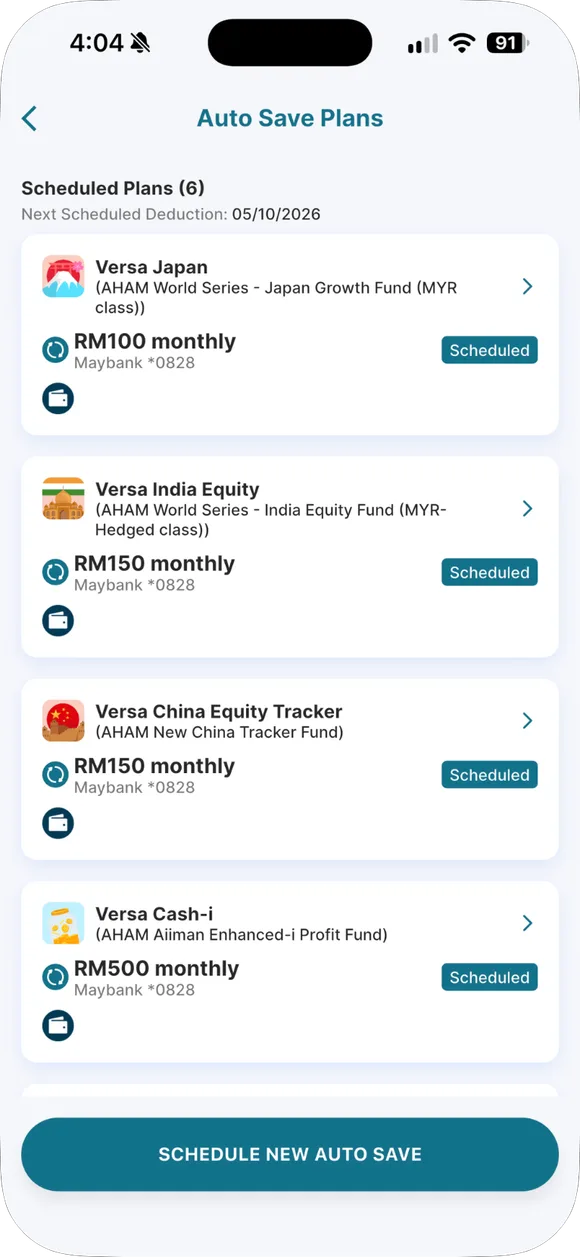
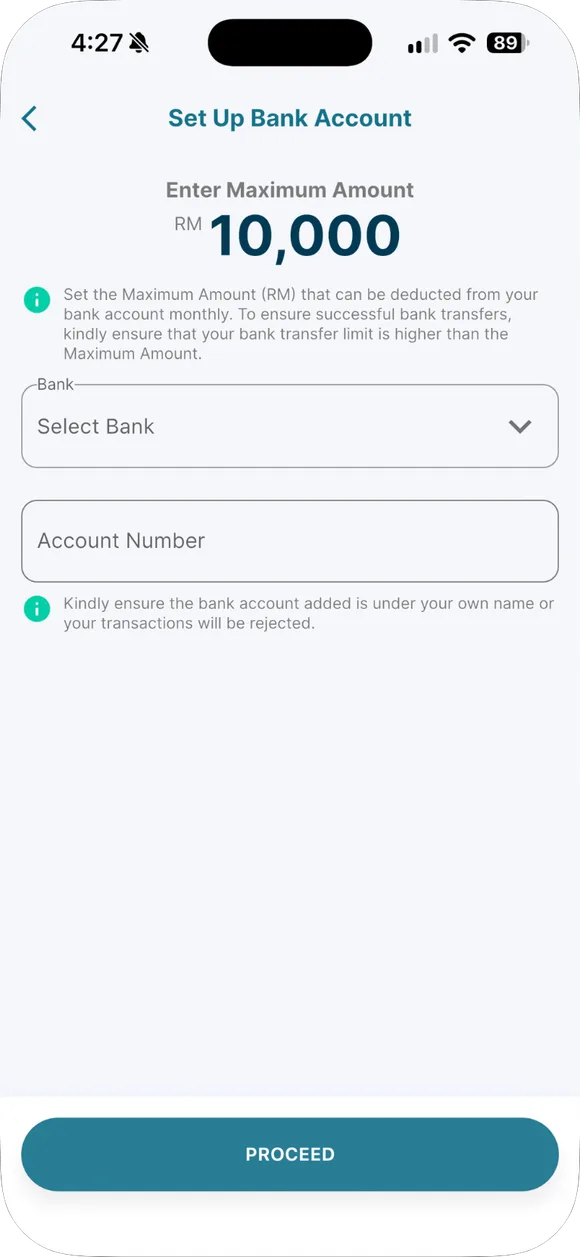
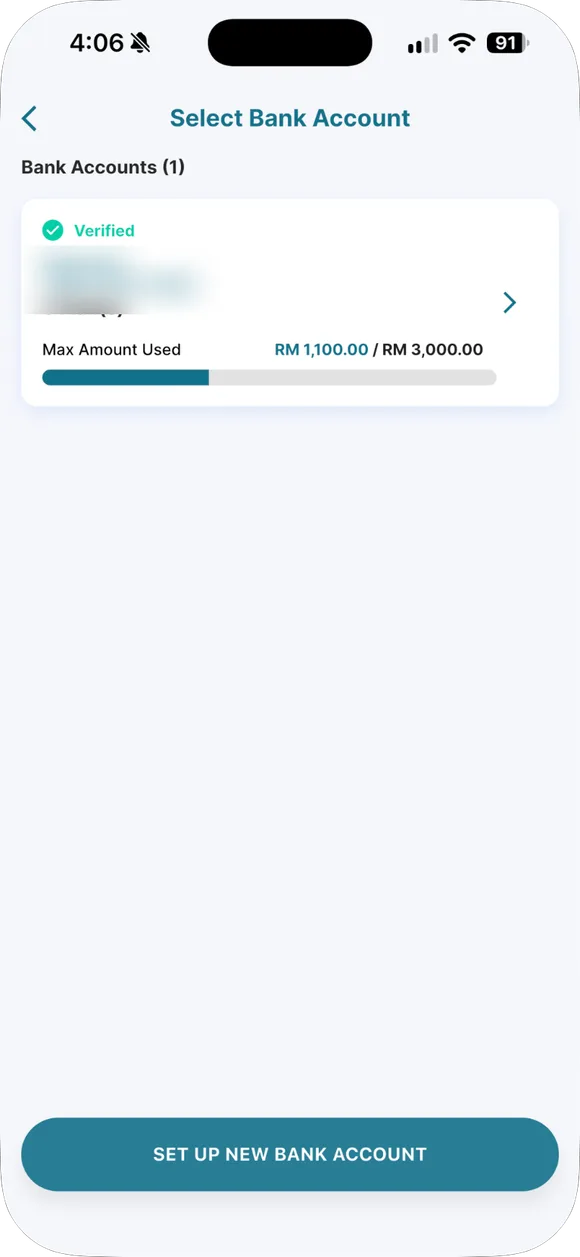
01/07
Manage → Auto Save
Open Manage and choose Auto Save. Your plan list is here.
- Manage → Auto Save. Open Manage and choose Auto Save. Your plan list is here.
- Add an Auto Save bank. Your Auto Save bank is registered separately from your cash-out bank. Set a monthly Maximum Amount, and make sure your bank transfer limit is higher than that. The bank deducts RM1 as a test, refunded the next business day.
- Wait for bank approval. Bank approval takes 3 to 4 working days. Once approved, the bank shows a Verified tick and you can pick it when creating a plan.
- Create a plan. Choose a fund, type the monthly amount and the Maximum Amount. Many people pick RM500 because most booster quests ask for an Auto Save of RM500 or more.
- If you see "Maximum Amount is fully allocated". It means that bank's monthly cap is used up by other plans. Raise the cap (another RM1 test, done in T+3) or add another bank.
- Plan active. Plans are usually approved in under an hour. Deductions happen on the 5th. A plan created after T−6 at 3 pm starts next month.
- Edit or delete. Plans can be edited after 3 business days, but are locked from T−6 at 3 pm to T+1 at 11:59 pm. Want to stop? Delete the plan; cashing out everything does not stop deductions.
Two steps: bank first, then the plan
Step 1: Auto Save Bank Account. Your Auto Save bank is registered separately from your cash-out bank. When you add it, Auto Save bank test: RM1 is deducted and refunded the next business day. Approval takes Auto Save bank approval: 3 to 4 working days. The bank must be under your own name and IC.
Step 2: Auto Save Plan. Pick a fund, a monthly amount and a Maximum Amount. The plan gets approved in Auto Save plan approval: usually under an hour. One bank can have one plan per portfolio, but you can add multiple banks and multiple plans.
When the deduction happens
Auto Save deduction date: the 5th of every month. For banks other than Maybank, if the 5th falls on a weekend or public holiday, the deduction happens the next business day. Maybank always deducts on the 5th. After the deduction, money reaches the fund within Auto Save reaches the fund: 2 to 3 business days after deduction; Cash-i takes one more day.
Want the actual date for this month? Pick “Auto Save” in the calculator:
When will my money arrive?
Choose the transaction, fund, date and time. The calculator counts business days using Versa's official schedule.
Lands in the fund between Thu, 8 Oct 2026 and Fri, 9 Oct 2026
- 1Wed, 16 Sep 2026You submit the requestA new plan created after roughly 6 days before the 5th (3 pm) starts deducting the following month.
- Mon, 5 Oct 2026Bank deducts Auto SaveMaybank always deducts on the 5th even on holidays. Other banks deduct on the next business day.
- Thu, 8 Oct 2026Lands in the fund (Thu, 8 Oct 2026 – Fri, 9 Oct 2026)
Estimate based on Versa's official schedule. Your bank may be slower.
National public holidays only. State holidays differ by state and can add 1 business day.
Cut-off: does a new plan start this month or next
There’s Auto Save cut-off for this month: 6 days before the 5th, at 3:00 PM (T−6). A bank or plan created after that time starts deducting next month. Plans are also locked from Plan edit lock period: T−6 3:00 PM to T+1 11:59 PM; during that window you can’t edit or delete them. A new plan can only be edited after 3 business days.
Maximum Amount
Auto Save Bank Account (ADBA)The bank registered for Auto Save. It has a monthly limit called the Maximum Amount. is the monthly deduction limit for one bank. If you have several plans using the same bank, all of them combined can’t exceed this limit.
If you see the pop-up “Maximum Amount is fully allocated”, that limit has been used up. Two options: raise the limit (another RM1 test, done within T+3), or add a different bank.
If the bank doesn’t have enough money
The deduction fails. Failed Auto Save: 3 failures in a row and the plan and bank are removed automatically. If you’re doing a quest that requires Auto Save, that month won’t qualify. Make sure the money is in the bank before the 5th.
Stopping Auto Save
If you do RM500 a month, what do you get?
This projection uses Cash-i’s current base nett return. The rate slider caps at 6%, and anything above the base rate is labelled as your own assumption.
What if you auto-save every month?
A simple monthly-compounding projection for Versa Save.
Total you put in
RM18,000
Estimated value
RM18,910
Estimated returns: RM910
Real returns go up and down; this is not a fixed deposit.
Illustration only. The base rate changes every month. Invest funds are not projected because their value can fall.
Common questions on this topic
You Cash Out everything, but Auto Save still deducts money?
Yes, Auto Save doesn't stop on its own. You need to delete the plan inside the app.
Does the 10% p.a. apply to all your money?
No. The 10% Save Booster only applies to the first RM500 of Auto Save per month, for 3 months. Work out the numbers with a calculator first.
Source: versa.com.my/10-p-a-auto-save-bonus-for-september-new-joiners ↗
When does Auto Save deduct money?
On the 5th of every month, except Maybank which deducts on the next working day if the 5th falls on a holiday. It reaches the fund in 2 to 3 working days, with Cash-i taking one extra day.
Why is RM1 deducted when you set up your bank for Auto Save?
It's an account verification test, refunded the next working day. Bank approval takes 3 to 4 working days, but setting up the plan itself takes under an hour.
What does "Maximum Amount is fully allocated" mean?
Your bank's monthly limit has already been used up by another plan. Raise the limit (takes T+3) or add another bank.
What happens if your bank has insufficient funds on the 5th?
After 3 failed attempts in a row, the plan and the linked bank get automatically removed.

Already have a Versa account?
Open the app and do this step now, while it is fresh in your mind.
Past returns do not guarantee future returns. Unit prices can go down. Not financial advice.